Unit 3 · GROUP BY, COUNT, SUM, AVG, MIN/MAX, HAVING
Unit 3 · GROUP BY, COUNT, SUM, AVG, MIN/MAX, HAVING
Data file / 資料檔:student table for the worked examples; ClassWork 3 uses an extended scores file (with Subject and Gender columns).
- Unit content / 單元內容:same
sql_classfile as Unit 2 → sql_class - ClassWork 3 / 課後練習:scores file
Start Here / 開始做題
- Decide which column you are grouping by (usually the "category" column, e.g.
Class). 先決定要依哪一欄分組。 - Decide which aggregate function you need:
COUNT,SUM,AVG,MIN,MAX. 再決定要用哪個聚合函式。 - If you need to filter groups (not rows), use
HAVING, notWHERE. 篩選「分組後」的結果要用HAVING,不是WHERE。
Unit Dashboard / 單元地圖
| Learn | Meaning | Use |
|---|---|---|
GROUP BY col | put rows into groups sharing the same value | one row per class/subject |
COUNT(*) | count rows in each group | number of students |
SUM(col) | add up a column within each group | total score |
AVG(col) | average a column within each group | average score |
MIN(col) / MAX(col) | smallest / largest value in each group | lowest / highest score |
HAVING | filter groups after aggregation | "average > 70" |
Quick Concepts / 重點
| Syntax | Student note |
|---|---|
SELECT Class, COUNT(*) AS n FROM t GROUP BY Class; | one row per class, with a count. 每班一列,附上人數。 |
WHERE runs before grouping | filters individual rows. WHERE 在分組前就篩選。 |
HAVING runs after grouping | filters whole groups, using aggregate results. HAVING 在分組後篩選整組。 |
GROUP BY colA, colB | groups by the combination of two columns. 依兩個欄位的組合分組。 |
SQL Syntax / SQL 語法
SELECT Class, COUNT(*) AS student_count, AVG(Grade) AS avg_score
FROM student
GROUP BY Class
HAVING AVG(Grade) > 70;
Yellow Syntax Guide / 黃色語法重點
| Syntax | Meaning |
|---|---|
GROUP BY Class | one output row per distinct class |
COUNT(*) AS student_count | number of students in that class |
AVG(Grade) AS avg_score | average grade in that class |
HAVING AVG(Grade) > 70 | keep only classes whose average is above 70 |
Dry Run / 手算追蹤
Sample rows (illustrative only / 僅供示範):
| Class | Grade |
|---|---|
| F6A | 90 |
| F6A | 70 |
| F6B | 60 |
| F6B | 50 |
Grouped by Class: F6A → count 2, avg 80; F6B → count 2, avg 55. After HAVING AVG(Grade) > 70, only F6A remains.
先分組計算每班人數與平均分,再用 HAVING 篩掉平均分不足 70 的班級。
Examples / 例題
Example 3-1 · Count per Group
題目說明 / Problem Statement
Show how many students are in each class. 計算每個班級有多少學生。
Reference Answer / 參考答案
SELECT Class, COUNT(*) AS student_count
FROM student
GROUP BY Class;
Example 3-2 · Sum per Group
題目說明 / Problem Statement
Show the total grade score for each class. 計算每個班級的總分數。
Reference Answer / 參考答案
SELECT Class, SUM(Grade) AS total_score
FROM student
GROUP BY Class;
Example 3-3 · Average per Group
題目說明 / Problem Statement
Show the average grade for each class. 計算每個班級的平均分數。
Reference Answer / 參考答案
SELECT Class, AVG(Grade) AS avg_score
FROM student
GROUP BY Class;
Example 3-4 · Min and Max per Group
題目說明 / Problem Statement
Show the highest and lowest grade for each class. 計算每個班級最高分與最低分。
Reference Answer / 參考答案
SELECT Class, MAX(Grade) AS max_grade, MIN(Grade) AS min_grade
FROM student
GROUP BY Class;
Example 3-5 · Filter Groups with HAVING
題目說明 / Problem Statement
Show only classes whose average grade is above 70. 找出平均分數大於 70 的班級。
Reference Answer / 參考答案
SELECT Class, AVG(Grade) AS avg_score
FROM student
GROUP BY Class
HAVING AVG(Grade) > 70;
ClassWork 3 / 課後練習
Student task / 學生任務:先自行完成 SQL,再用每題下方的截圖核對結果。
This file adds
SubjectandGendercolumns to the student data. Check the actual column names in your downloaded file before writing your query. 本次資料檔多了「科目」與「性別」欄位,執行前請先核對實際欄位名稱。
ClassWork 3-1 · Count Students per Class
Count students per class. 計算每個班級的學生人數。
Reference Answer / 參考答案

ClassWork 3-2 · Average Score by Subject (Filtered)
Average score by subject, only keeping subjects with an average ≥ 75. 計算各科平均分,僅保留平均分 ≥ 75 的科目。
Reference Answer / 參考答案

ClassWork 3-3 · Total Score per Class per Subject
Show the total score for each class within each subject (no subquery required) — display subject, class, total score. 計算每科別中,各班級的總分;顯示科目、班級、總分(供比較用)。
Reference Answer / 參考答案

ClassWork 3-4 · Gender Distribution per Class
Show how many male (M) and female (F) students are in each class. 各班級的性別人數分佈(M/F 各有多少人)。
Reference Answer / 參考答案

ClassWork 3-5 · Classes with Many High Scorers
Find classes with at least 5 students scoring ≥ 85, ordered by that count from high to low. 找出「高分(≥85)人數 ≥ 5」的班級,並按人數由高到低排序。
Reference Answer / 參考答案

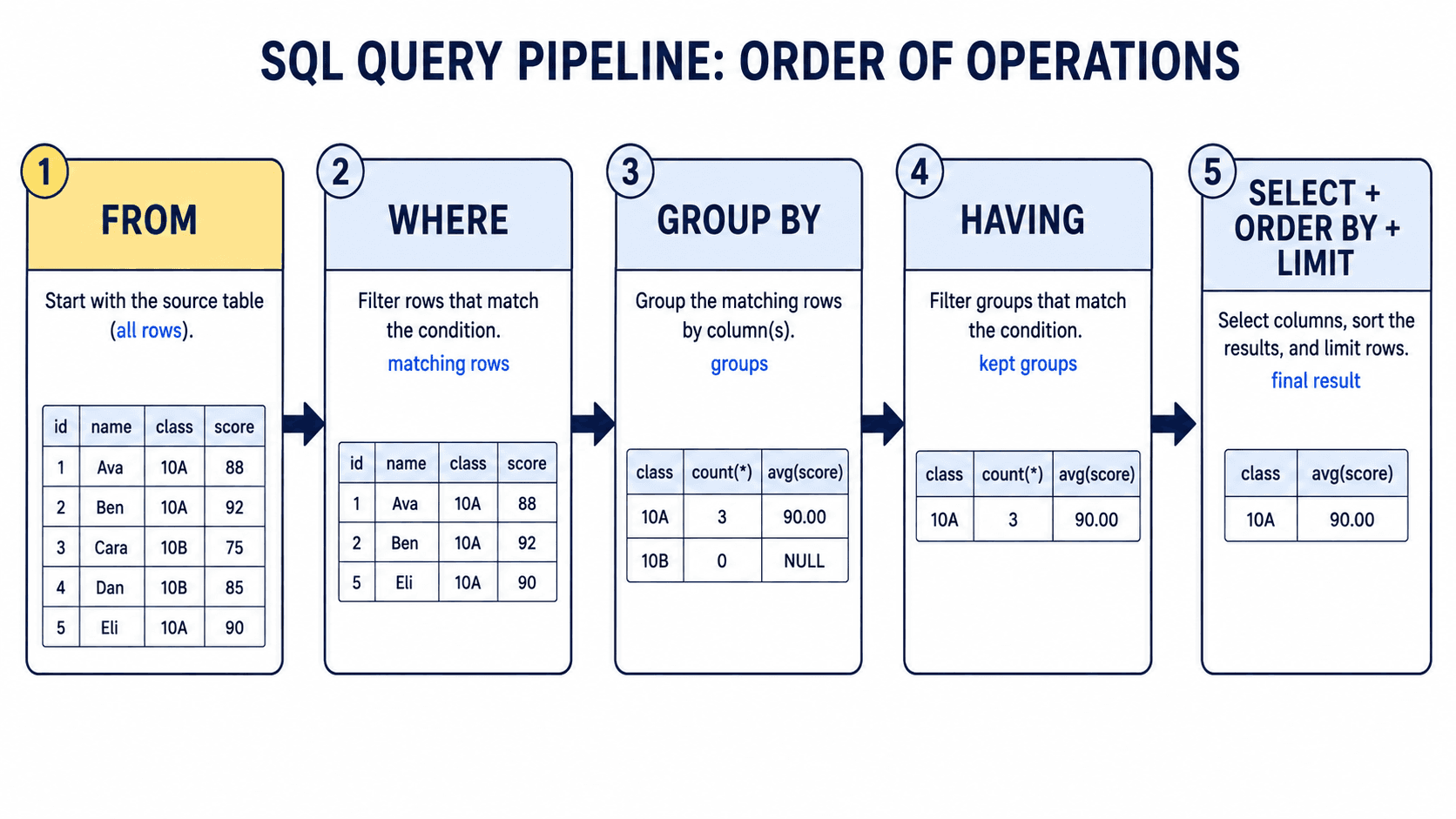
Visual: Query Pipeline / 查詢處理流程
Learning objective: distinguish filtering rows (WHERE) from filtering completed groups (HAVING).
Active Recall / 主動回想
- Without looking, which runs first:
WHEREorHAVING? Why? - A question says “each class with average grade above 70”: which three clauses are essential?
- What changes when a second column is added to
GROUP BY?
Spaced Review / 間隔複習
- Next lesson: classify five conditions as row filters or group filters.
- 1 week later: write a grouped query using a new table and explain its pipeline aloud.
Key Takeaways / 重點帶走
GROUP BYturns matching rows into groups.- Aggregate functions calculate one value per group.
WHEREfilters rows before grouping;HAVINGfilters groups after aggregation.
Common Mistakes / 常見錯誤
- Using
WHERE AVG(...)instead ofHAVING AVG(...). - Selecting a non-aggregated column that is not named in
GROUP BY.
30-Second Review / 30 秒複習
Complete aloud: FROM → WHERE → GROUP BY → HAVING → SELECT / ORDER BY / LIMIT.
